Docs · Your account and help
When something goes wrong
Every message in Emrg says what happened and what to do. Here they are in one place, grouped by where you'll meet them.
Jump to: Workers, Email and calendar, Limits and files, Signing in and access.
Workers
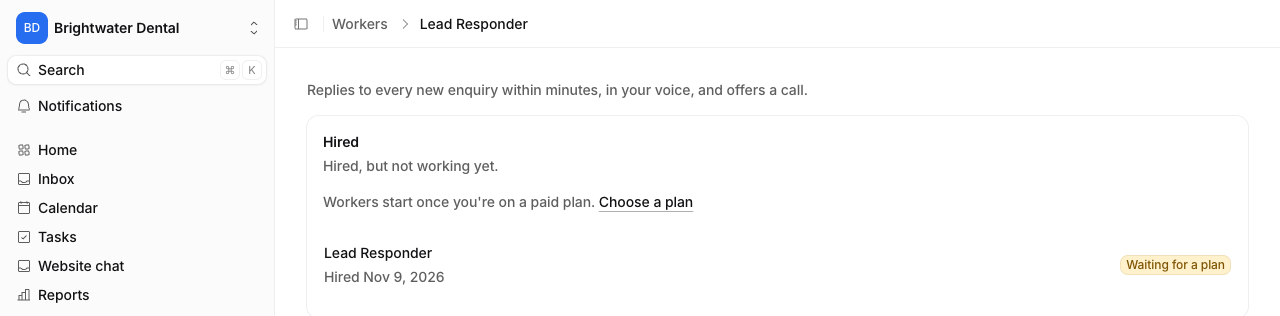
“Waiting for a plan, or Didn't run: needs a paid plan”
What it means: Workers only run on paid plans, so the worker noted what it would have done.
What to do: Choose a plan in Settings › Billing. Recent runs can then start again by themselves. Open a run's receipt to see whether it will, whether it offers Run now, or what to fix first. If Billing says "Payments open soon", plans aren't on sale yet.
“Didn't run: out of credits”
What it means: Your credits ran out, so the worker didn't start. Nothing was charged.
What to do: Buy a credit pack in Settings › Billing, or wait for next month's credits.
“Stopped at its limit”
What it means: The worker reached one of the limits on its page, such as messages a day.
What to do: Nothing is wrong. An owner or admin can raise the limit on the worker's page if it's too low.
“Run failed, or Could not finish; the credits were refunded”
What it means: The run couldn't get its work done, so its credits were given back. If it got part of the work done, it's charged for that part.
What to do: Open the receipt to see what it did. If it keeps happening, email support with the worker's name.
“Workers are paused, Outgoing email is on hold, or Workers and outgoing email are paused”
What it means: Emrg has paused workers or is holding outgoing email while we fix something. Nothing is lost.
What to do: Nothing to do. Approvals stay in your queue, and held email goes out once we're done.
Email and calendar
“Reconnect needed, or Emrg.ai lost access to this mailbox”
What it means: Emrg can no longer reach the mailbox, for example because access was removed at Google.
What to do: The person who connected it chooses Reconnect in Settings › Connections and signs in again.
“Some permissions were left unticked”
What it means: A box was unticked on Google's sign-in screen, so Emrg can't do its job.
What to do: Connect again and keep every box ticked.
“Google connections are full during early access”
What it means: Google limits how many Gmail accounts a new app may connect until it has reviewed it.
What to do: Keep using Emrg without a mailbox for now. Gmail opens once Google approves Emrg, and Outlook is coming soon.
“Sending from this mailbox is paused”
What it means: Emrg paused sending from this mailbox. The message says why: bounces or a spam complaint, a limit from your email provider, or a lost connection.
What to do: For bounces or a complaint, check the addresses you've been emailing, then an admin can choose Resume in Settings › Sending. For a lost connection, reconnect the mailbox. A provider limit clears by itself.
“Nurture email is paused”
What it means: Newsletters and nurture email bounced or drew complaints too often.
What to do: Clean up the list, then resume it in Settings › Sending. If it says you can't lift the pause yourself, it clears by itself once our email provider allows sending again.
Limits and files
“Your storage is full”
What it means: Your files and email attachments have used all your plan's storage, so new ones can't be added.
What to do: Delete files you no longer need. For more room, add a storage pack in Settings › Billing, or on Free choose a paid plan there.
“This file is larger than 25 MB”
What it means: One file can be up to 25 MB.
What to do: Compress it or split it, then add it again.
“That file is over 20 MB”
What it means: An import file can be up to 20 MB.
What to do: Split it into smaller files and import each one.
“This workspace has … records, the most the plan holds”
What it means: Your workspace holds as many records as its plan allows. Leads from your website still come in.
What to do: Delete records you no longer need. On Free, Starter or Growth, you can also move to a bigger plan in Settings › Billing.
“This business can't take more enquiries through its website this month”
What it means: A visitor sees this when your forms, booking pages or chat have taken their most for this month.
What to do: They start again next month. Paid plans take far more.
“This workspace is making too many requests right now”
What it means: Something, for example a connected AI app, is asking Emrg for a lot in a short time.
What to do: Wait a minute and try again.
Signing in and access
“Join the waitlist”
What it means: We're letting people in a few at a time during early access.
What to do: Join the waitlist and we'll open your place as soon as we can. If someone invited you to their workspace, sign up with the address they invited and you can join straight away.
“Only workspace owners and admins can …”
What it means: Your role doesn't include that.
What to do: Ask an owner or admin to do it, or to change your role. What each role can do.
“We could not find that page, or This contact isn't here”
What it means: The link is old, the record was deleted, or it belongs to another workspace.
What to do: Search for it, or check you're in the right workspace.
“Something went wrong on our side”
What it means: Emrg hit a problem it couldn't recover from.
What to do: Try again in a moment. If it keeps happening, email support and say what you were doing.
Not listed here? Email support@emrg.ai with the exact message and what you were doing.
Still stuck?
Email support@emrg.ai from the address you use for Emrg, with the name of your workspace, and a person will reply.