Docs · Get work done
Hire a worker and approve its work
Workers draft replies, follow up and keep your pipeline tidy. They ask you before they act, and you decide, one kind of action at a time, when they may go ahead on their own.
Hire a worker
- Open Workers in the sidebar and pick one, such as Lead Responder. What each worker does.
- Choose Hire. It starts with sensible settings: what it watches for, its limits, and asking you before anything goes out.
- Choose Edit to give it a name, describe its job in plain words, and add rules, one per line, such as "Never offer discounts above 10%".
Owners and admins can hire and change workers. Members can see workers, and members and clients can decide on approvals.
Workers run on paid plans. On the free plan you can hire one, but it shows Waiting for a plan, and anything that would have started it is kept as Needs a paid plan. Once you choose a plan, recent ones can start again by themselves. Each one's receipt says whether it will, offers Run now, or says what to fix first.
Early access. If Settings › Billing says "Payments open soon", plans aren't on sale yet, so workers can't start. The CRM, your inbox, forms, booking pages and website chat all work for free meanwhile.
Want something none of the workers do? Choose Describe a worker and say what it should do. Emrg writes it for you and shows the credits it costs before anything is charged.
Approve, edit or reject its work
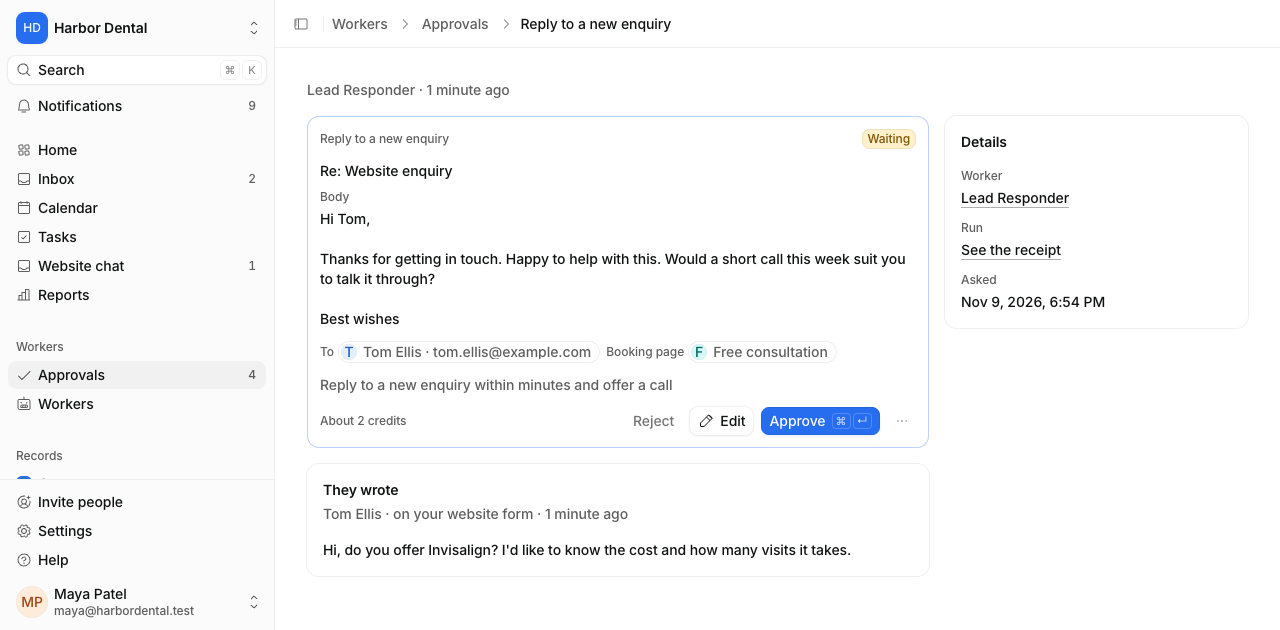
Work that needs your say waits in Approvals in the sidebar. At first, that's anything a worker wants to send. Each one shows what it wants to do, who it goes to, and for a reply, what the person wrote to you.
- Approve sends it as it is.
- Edit lets you change the wording (not who it goes to); then choose Approve. Your edits are saved to guide its future drafts.
- Reject asks you to say why. Your reason is saved to guide its future drafts.
- In the ⋯ menu beside them, Send back asks for a new draft with your note, and Approve all similar clears a batch at once.
An approval nobody decides on normally expires after 7 days. If Emrg has paused workers while we fix a problem, their approvals wait for you instead. You can also approve or reject from Claude or ChatGPT; editing happens in Emrg. A worker never approves its own work.
Let a worker act on its own
On a worker's page, What it may do alone lists each kind of action it takes, with one of three settings:
- Ask me first: waits in Approvals until a person decides. This is where anything that goes out starts.
- Supervisor checks it: a supervisor reviews it and asks you only when unsure.
- Does it alone: acts straight away and logs it.
Each kind of action keeps a track record. After at least 20 decisions with 9 in 10 approved unchanged, Emrg suggests giving it more room; choose Apply if you agree. Emrg never changes the setting by itself, and owners and admins can move it back at any time.
Some things always need a person: deleting records, and anything a custom worker sends or changes in another tool you've connected. Custom workers can look things up in tools you connect without asking.
Limits and off switches
Every worker has limits on its page: at most 25 record changes in one run and 50 messages a day to start with, and an optional number of credits it may use a day. Owners and admins can change them.
- Pause stops a worker until you choose Resume.
- Stop now, under More actions, stops it immediately.
- Let go retires it for good.
- Stop all workers, on the Workers page, stops every worker at once.
See what it did
Every run leaves a receipt on the worker's page: what started it, what it did, and the credits it used. A run is charged for the work it gets done. If it gets nothing done, for example because it failed or you turned down what it proposed, its credits are given back.
Still stuck?
Email support@emrg.ai from the address you use for Emrg, with the name of your workspace, and a person will reply.