Docs · Plans and money
Run client workspaces as an agency
Look after every client from one console: a workspace per client, one shared credit balance with a limit for each, and a clean handover when a client takes over its own billing.
Turn on agency mode
Choose I run an agency while you set up, or open Set up agency mode later, then choose Use as my agency. Only the account's owner can do this. Your plan and credits don't change; agency mode adds the Agency console, which you open from the workspace switcher.
The console's sidebar has five pages: Overview, Approvals, Clients, Usage and Templates. Your own workspace is marked Your agency.
Add a client
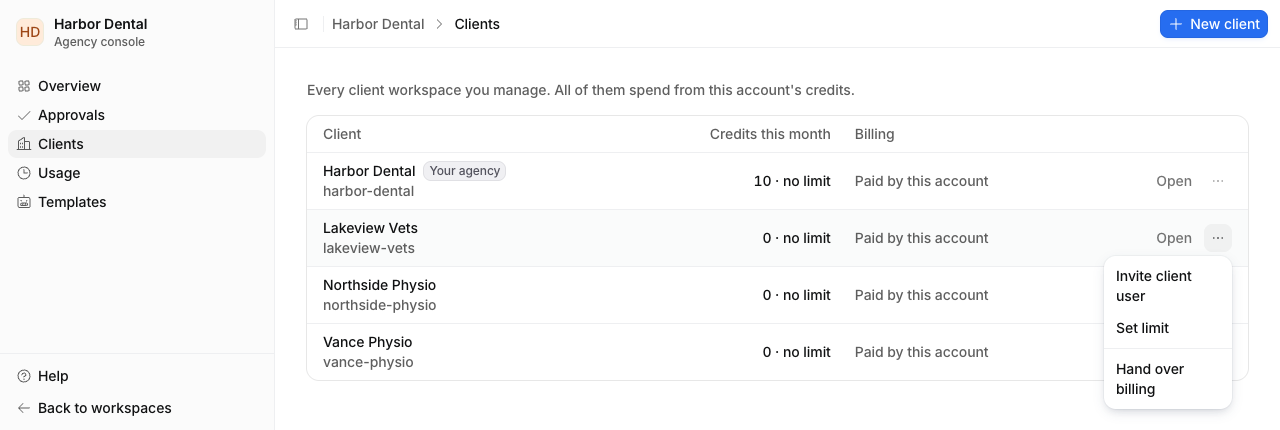
In Clients, choose New client and give it a name. Pick a template to start it with your usual pipelines, forms and workers; no client data comes with a template. Each client workspace spends from your account's credits. Then choose Invite client user in its … menu to bring the client in with the client role, so they can follow along and approve work without changing records.
Set a monthly limit per client
Choose Set limit in a client's … menu to cap the credits its workers may use each calendar month. When a client reaches its limit, its workers stop until the next month or until you raise it. Other clients carry on.
One approvals queue
Approvals in the console shows what workers in every client's workspace are waiting on you for, so you can clear them in one place.
Usage for rebilling
Usage shows the credits each client used. Choose Download CSV for a spreadsheet with each client, period, worker, action and credits, ready to rebill.
Reuse a tuned worker
Save a worker you've tuned in one client as a template, then choose Hire into clients to add it to others with its triggers, limits and settings. Clients that already have that worker are shown as such and skipped. Don't put a person's or client's name in a template's rules.
Hand a client over
When a client wants its own billing, choose Hand over billing in its … menu in Clients. Download its usage first. Then:
- Stop the client's workers if they're running. Emrg won't hand over a workspace with workers still working.
- Copy the link Emrg gives you and send it to the client yourself. It works for 14 days.
- The client signs in with the invited email and chooses Accept and take over billing.
The client becomes the workspace's owner, and your team stays on as admins until the client removes you. Your credits stay with you. The client needs its own paid plan for workers to run again.
Agency pricing is set with you: email support@emrg.ai.
Still stuck?
Email support@emrg.ai from the address you use for Emrg, with the name of your workspace, and a person will reply.